Reference Fields
The reference field allows a "parent" document to connect to another document in a different collection. This relationship only needs to be defined on one side.
Once defined, the values of the referenced document become available to the parent.
Type Definition
For additional properties common to all Field types, check the Field type definition.
Set this to "reference" to use the Reference Field.
The collections to reference.
The name of the field for internal use.
All properties marked as REQUIRED must be specified for the field to work properly.
Conceptualising the Reference type
Given the following schema...
schema: {collections: [{label: 'Post',name: 'post',path: 'posts',fields: [{label: 'Author',name: 'author',type: 'reference',collections: ['author'],},],},{label: 'Author',name: 'author',path: 'authors',fields: [{label: 'Name',name: 'name',type: 'string',},],},],}
The post collection has a reference field to the author collection.
When editing in Tina, the user will be able to choose a document in the author collection for the value of author.

When querying for a post document via the client or raw GraphQL, the author key in the response will contain the values of the referenced author document:
If the collection you are referencing contains a large number of items then you may run into timeout issues. Check out FAQ - Getting a 503 Service Unavailable error when loading the reference field for more information.
{post(relativePath: "edgar.md") {titleauthor {... on Author {name}}}}
{"data": {"post": {"author": {"name": "Edgar Allama Poe"}}}}
Searching References
You can search your references based on document file-path.

Filtering References
If you have a long list of reference items, you can filter them in the schema using the ui.collectionFilter field using a property from the referenced collection.
The current
collectionFilteronly supports properties of type string and is also case sensitive.
To only show authors who's location is set to 'Australia':
const referenceField = {label: 'Author',name: 'author',type: 'reference',ui: {collectionFilter: {author: {location: 'Australia',},},},collections: ['author'],};
Custom Document Labels
By default the reference selector shows the document filename. This can be set to a custom react component using ui.optionComponent instead.
The optionComponent function provides you with two parameters: props and _internalSys.
propsrepresents the fields from the reference collection._internalSyscontains various useful information for you to use in the custom component such as thefile nameandpath.

If you require strict typing in your application, you'll need to manually declare the type of
propsforoptionComponentahead of time. See examples below.
Since this is dependent on your schema, runconsole.log(props)orconsole.log(_internalSys)to get the full list of values accessible.
Examples
Simple field
{label: 'Author',name: 'author',type: 'reference',collections: ['author'],},
Field filtered by multiple values
Members of the author collection with their location set to either 'Australia' or 'United States' will be included.
{label: 'Author',name: 'author',type: 'reference',ui: {collectionFilter: {author: {location: ['Australia', 'United States']}},},collections: ['author'],}
Field with multiple collections and filtering
Members of both the author and post collections will be included, depending on their respective filtered conditions.
{label: 'Author & Post',name: 'author and post',type: 'reference',ui: {collectionFilter: {author: {location: ['Australia', 'United States']},post: {status: 'published',},},},collections: ['author', 'post'],}
Field with dynamic filter conditions
Using a function with ui.collectionFilter for dynamic rendering, triggered at runtime.
const getLocation = () => {const url = new URL('https://bob-northwind-sydney.com');const hostname = url.hostname;return hostname;};const referenceField = {label: 'Author & Post',name: 'author and post',type: 'reference',ui: {collectionFilter: () => {const location = getLocation();return {author: {location: location,},};},},collections: ['author'],};
If you pass in a function, it should be passed as an executable. Running something like
const url = new URL('https://bob-northwind-sydney.com')directly in the callback isn't allowed.
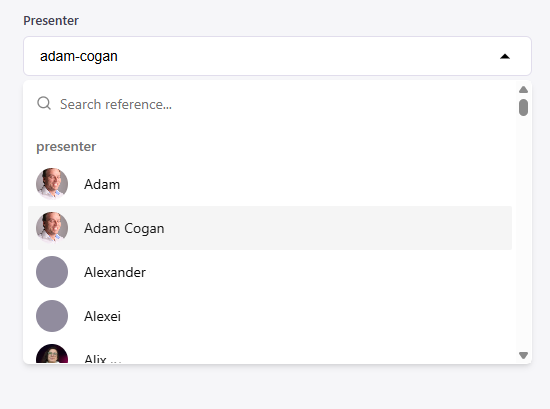
Field with simple custom label
A simple example of using optionComponent for custom reference labels.
ProfilePicture is a custom component referenced but not included in the example.
{type: "reference",name: "presenter",label: "Presenter",collections: ["presenter"],ui: {optionComponent: (props: {presenter: { name?: string };profileImg: string},_internalSys: { path: string }) => {const presenter = props.presenter;if (!presenter.name) return _internalSys.path;return (<p className="flex min-h-8 items-center gap-4">{props.profileImg && (<ProfilePicturesrc={props.profileImg}alt={`${presenter.name} Profile`}/>)}{presenter.name}{" "}</p>);}}
Field with multiple collections and custom label (advanced)
The below example shows a collection, called reference, associated to both the author and post collections with a reference field. The ui.optionComponent property defines how the labels of each document will appear in the UI.
AuthorCollectionCustomReference and PostCollectionCustomReference are the custom components not included in the example.
collections: [//collection 1 - authors{label: 'Authors',name: 'author',path: 'content/author',format: 'md',fields: [{type: 'string',label: 'Name',name: 'name',required: true,},{type: 'string',label: 'description',name: 'description',required: true,},],},//collection 2 - posts{label: 'Posts',name: 'post',path: 'content/posts',format: 'md',fields: [{type: 'string',label: 'title',name: 'Title',required: true,},],},//collection 3 - reference collection{label: 'Author and Post',name: 'reference',path: 'content/references',fields: [{label: 'Author',name: 'author',type: 'reference',collections: ['author', 'post'],ui: {//custom reference labeloptionComponent: (props: CollectionProps,_internalSys: InternalSys) => {//choosing component based on collection typeswitch (props._collection) {case COLLECTIONS.AUTHOR:return (//imported react component<AuthorCollectionCustomReferencename={props.name}description={props.description}/>)case COLLECTIONS.POST:return (<PostCollectionCustomReferencetitle={props.title}/>)default:return _internalSys.path}},},},]}],
We also need to define expected types ourselves based on what we need.
Using the AuthorProps interface as an example, the optionComponent function can expect the name and description we're using from the props input.
The _collection field is provided by the system to represent the specific collection (author or post in this case).
// You should define the types for the fields in the author collection for type safetyexport interface AuthorProps {name: string;description: string;_collection: 'author';}// You should define the types for the fields in the post collection for type safetyexport interface PostProps {title: string;excerpt: string;_collection: 'post';}// You should define the list of collection used in the reference for type safetyexport enum COLLECTIONS {AUTHOR = 'author',POST = 'post',}// InternalSys is from tinacms where it gives a lot of useful information for user to customize their custom componentexport interface InternalSys {filename: string;path: string;}export type CollectionProps = AuthorProps | PostProps;