引用字段
reference字段允许一个“父”文档连接到不同集合中的另一个文档。这种关系只需要在一侧定义。
一旦定义,引用文档的值将可用于父文档。
类型定义
有关所有字段类型的其他常见属性,请查看字段类型定义。
将此设置为"reference"以使用引用字段。
要引用的集合。
供内部使用的字段名称。
All properties marked as REQUIRED must be specified for the field to work properly.
理解引用类型
给定以下模式...
schema: {collections: [{label: 'Post',name: 'post',path: 'posts',fields: [{label: 'Author',name: 'author',type: 'reference',collections: ['author'],},],},{label: 'Author',name: 'author',path: 'authors',fields: [{label: 'Name',name: 'name',type: 'string',},],},],}
post集合有一个指向author集合的reference字段。
在Tina中编辑时,用户将能够为author的值选择author集合中的一个文档。

通过客户端或原始GraphQL查询post文档时,响应中的author键将包含引用的author文档的值:
如果您引用的集合包含大量项目,则可能会遇到超时问题。查看FAQ - 加载引用字段时出现503服务不可用错误以获取更多信息。
{post(relativePath: "edgar.md") {titleauthor {... on Author {name}}}}
{"data": {"post": {"author": {"name": "Edgar Allama Poe"}}}}
搜索引用
您可以根据文档文件路径搜索引用。

过滤引用
如果您有一个很长的引用项目列表,可以使用ui.collectionFilter字段在模式中使用引用集合中的属性来过滤它们。
当前的
collectionFilter仅支持字符串类型的属性,并且是区分大小写的。
仅显示位置设置为“澳大利亚”的作者:
const referenceField = {label: 'Author',name: 'author',type: 'reference',ui: {collectionFilter: {author: {location: 'Australia',},},},collections: ['author'],};
自定义文档标签
默认情况下,引用选择器显示文档文件名。这可以使用ui.optionComponent设置为自定义react组件。
optionComponent函数为您提供两个参数:props和_internalSys。
props表示来自引用集合的字段。_internalSys包含各种有用的信息供您在自定义组件中使用,例如文件名和路径。

如果您的应用程序需要严格的类型,您需要提前手动声明
optionComponent的props类型。请参见下面的示例。
由于这取决于您的模式,运行console.log(props)或console.log(_internalSys)以获取可访问的完整值列表。
示例
简单字段
{label: 'Author',name: 'author',type: 'reference',collections: ['author'],},
按多个值过滤的字段
位置设置为“澳大利亚”或“美国”的作者集合成员将被包括在内。
{label: 'Author',name: 'author',type: 'reference',ui: {collectionFilter: {author: {location: ['Australia', 'United States']}},},collections: ['author'],}
具有多个集合和过滤的字段
作者和帖子集合的成员将被包括在内,具体取决于它们各自的过滤条件。
{label: 'Author & Post',name: 'author and post',type: 'reference',ui: {collectionFilter: {author: {location: ['Australia', 'United States']},post: {status: 'published',},},},collections: ['author', 'post'],}
具有动态过滤条件的字段
使用ui.collectionFilter的函数进行动态渲染,在运行时触发。
const getLocation = () => {const url = new URL('https://bob-northwind-sydney.com');const hostname = url.hostname;return hostname;};const referenceField = {label: 'Author & Post',name: 'author and post',type: 'reference',ui: {collectionFilter: () => {const location = getLocation();return {author: {location: location,},};},},collections: ['author'],};
如果您传入一个函数,它应该作为可执行传递。直接在回调中运行类似
const url = new URL('https://bob-northwind-sydney.com')的操作是不允许的。
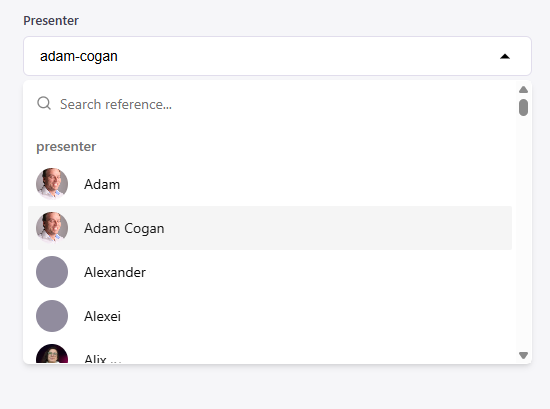
具有简单自定义标签的字段
使用optionComponent进行自定义引用标签的简单示例。
ProfilePicture是一个自定义组件,在示例中未包含。
{type: "reference",name: "presenter",label: "Presenter",collections: ["presenter"],ui: {optionComponent: (props: {presenter: { name?: string };profileImg: string},_internalSys: { path: string }) => {const presenter = props.presenter;if (!presenter.name) return _internalSys.path;return (<p className="flex min-h-8 items-center gap-4">{props.profileImg && (<ProfilePicturesrc={props.profileImg}alt={`${presenter.name} Profile`}/>)}{presenter.name}{" "}</p>);}}
具有多个集合和自定义标签的字段(高级)
下面的示例显示了一个名为reference的集合,与作者和帖子集合相关联,并具有一个引用字段。ui.optionComponent属性定义了每个文档在UI中的标签显示方式。
AuthorCollectionCustomReference和PostCollectionCustomReference是未包含在示例中的自定义组件。
collections: [//collection 1 - authors{label: 'Authors',name: 'author',path: 'content/author',format: 'md',fields: [{type: 'string',label: 'Name',name: 'name',required: true,},{type: 'string',label: 'description',name: 'description',required: true,},],},//collection 2 - posts{label: 'Posts',name: 'post',path: 'content/posts',format: 'md',fields: [{type: 'string',label: 'title',name: 'Title',required: true,},],},//collection 3 - reference collection{label: 'Author and Post',name: 'reference',path: 'content/references',fields: [{label: 'Author',name: 'author',type: 'reference',collections: ['author', 'post'],ui: {//custom reference labeloptionComponent: (props: CollectionProps,_internalSys: InternalSys) => {//choosing component based on collection typeswitch (props._collection) {case COLLECTIONS.AUTHOR:return (//imported react component<AuthorCollectionCustomReferencename={props.name}description={props.description}/>)case COLLECTIONS.POST:return (<PostCollectionCustomReferencetitle={props.title}/>)default:return _internalSys.path}},},},]}],
我们还需要根据需要自行定义预期类型。
以AuthorProps接口为例,optionComponent函数可以期望我们从props输入中使用的名称和描述。
_collection字段由系统提供,用于表示特定集合(在此情况下为作者或帖子)。
// 您应该为作者集合中的字段定义类型以确保类型安全export interface AuthorProps {name: string;description: string;_collection: 'author';}// 您应该为帖子集合中的字段定义类型以确保类型安全export interface PostProps {title: string;excerpt: string;_collection: 'post';}// 您应该定义引用中使用的集合列表以确保类型安全export enum COLLECTIONS {AUTHOR = 'author',POST = 'post',}// InternalSys来自tinacms,它提供了许多有用的信息供用户自定义他们的自定义组件export interface InternalSys {filename: string;path: string;}export type CollectionProps = AuthorProps | PostProps;