Separate Content Repos are here for TinaCloud
By Josh Berman

TinaCloud projects can now bind two GitHub repositories: a generator repo that holds your TinaCMS schema and application code, and a separate content repo that holds your markdown, MDX, and media.
TL;DR: One TinaCloud project, two repos. Editors commit content to the content repo, engineers commit code to the generator repo, and TinaCloud keeps everything connected. It is a toggle in the dashboard, available for new and existing projects today.
Why split your repos?
Plenty of teams have asked for this, and they usually want it for one of a few reasons:
- Decoupled commit history. Editors commit dozens of small content edits a day. Engineers commit once or twice. Keeping them in different repos keeps each repo's history readable.
- Permissions hygiene. Editors get write access to the content repo without ever touching application code.
- Scaling. As a site grows, content volume grows much faster than code. Splitting the repos keeps the generator repo lean, so clones, CI builds, and code reviews stay fast no matter how large the content library gets.
- Multi-site reuse. A single content repo can power more than one generator, like regional sites, partner-facing variants, internationalized sites serving translated content per locale, or docs and marketing sites sharing one source of truth.
Until now, the workaround was to create two TinaCloud projects and wire them together with a tina/meta.json file. That pattern worked, but it came with sync issues, duplicate TinaCMS lock files, and search results that could drift out of date. Separate content repos replace it with a single project that understands both repos natively.
How it works
From your editors' point of view, nothing changes. They open the dashboard, edit, save, and submit for review exactly as before. Behind the scenes:
- Schema is loaded from the generator repo. It is never read from the content repo.
- Editorial branches and pull requests created through TinaCMS's editorial workflow are made on the content repo.
- Media uploads go to the content repo.
- Search re-indexes on every content-repo push, so results stay current no matter which repo changed.
Here is what lives where:
Setting up a new project
The option is right in the create-project flow:
- From the TinaCloud dashboard, click Create Project.
- Pick your generator repo as you would for any project.
- Toggle on Use a separate content repository.
- Pick the content repo from the list.
- Click create.
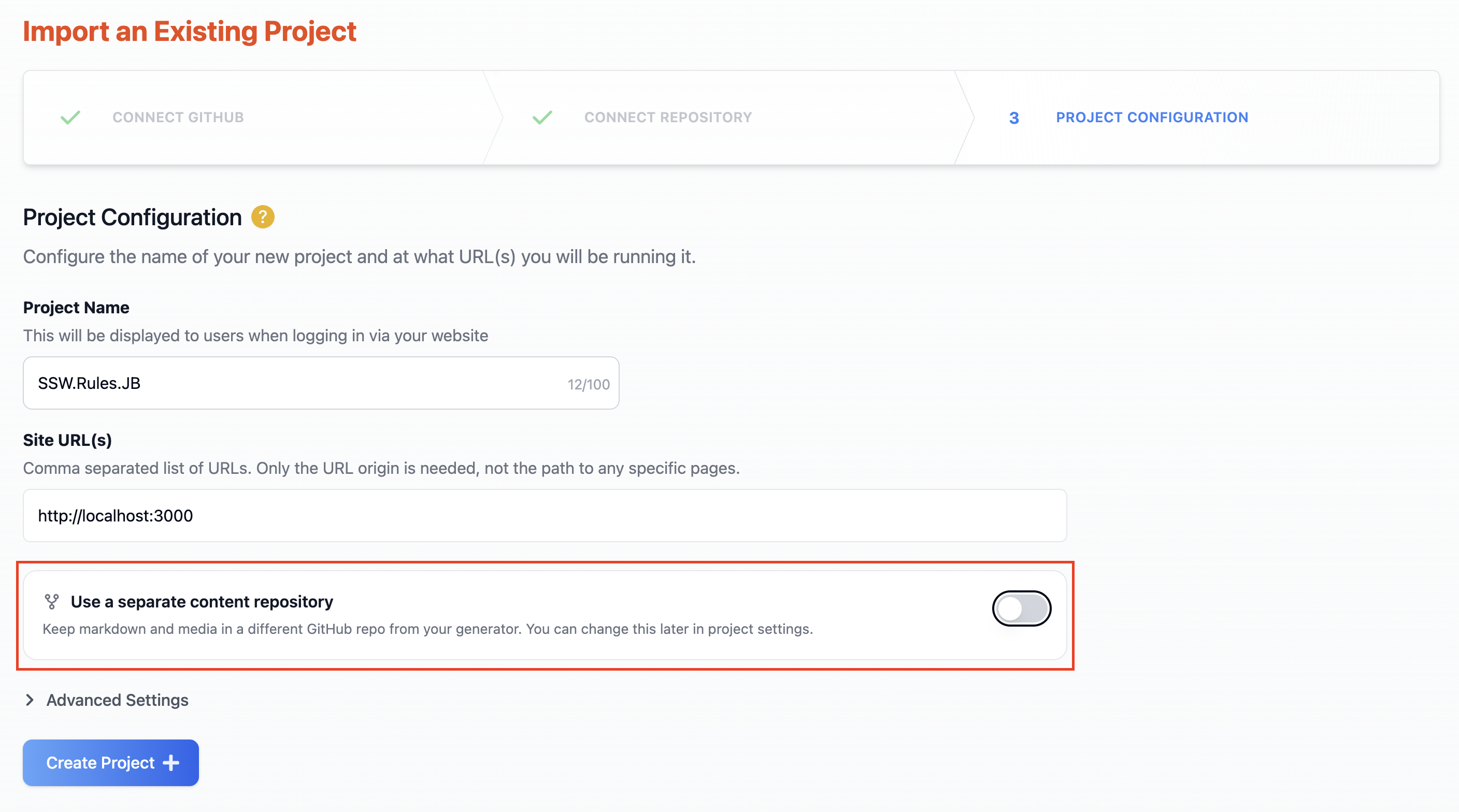
TinaCloud installs the necessary GitHub webhooks on both repos automatically. The content repo does not need a tina/ folder. The dashboard indexes it from scratch.
Converting an existing project
Already have a single-repo project? You can convert it without recreating anything:
- Open your project's Configuration page.
- Find the Content Repository section.
- Toggle on Use a separate content repository.
- Pick the content repo and confirm.
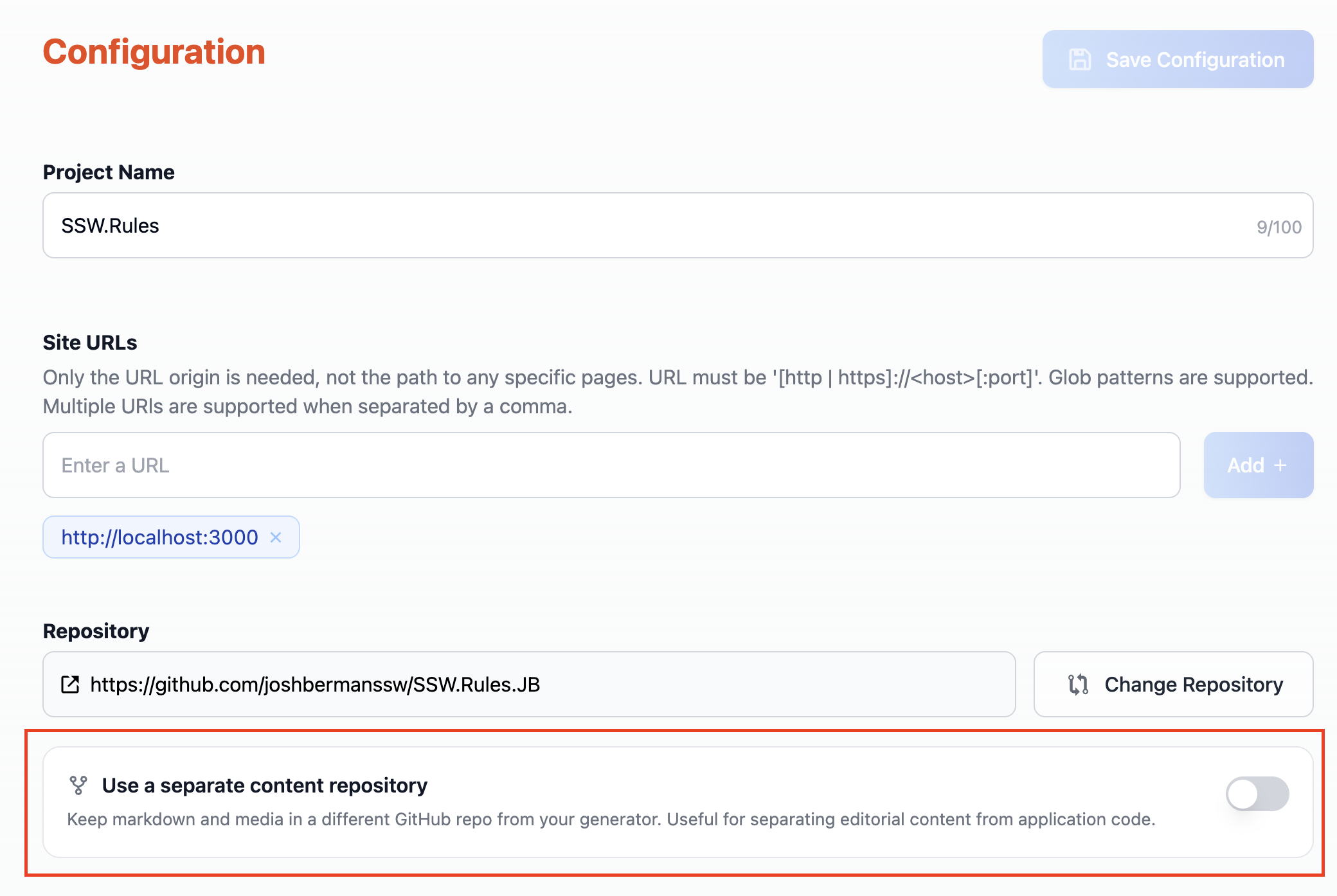
TinaCloud indexes the content repo's default branch and re-routes editorial workflow operations to it. The toggle works in reverse too, so you can revert to single-repo later.
Local development
Locally, the two repos sit side by side on disk. Point your config at the content repo with the new localContentPath field:
import { defineConfig } from 'tinacms';export default defineConfig({// ...your existing configlocalContentPath: '../my-content-repo',});
Then check both repos out as siblings and run your usual dev command from the generator repo:
parent/├── my-generator-repo/│ └── tina/│ └── config.tsx└── my-content-repo/└── content/└── posts/└── hello.mdx
tinacms dev watches the content repo's files alongside the generator's schema. Editing a content file hot-reloads the admin UI, editing your schema regenerates it, and generated artifacts only ever land in the generator repo.
localContentPath is local-dev only. In production, TinaCloud reads content from the content repo via GitHub regardless of this setting.
Already using the old two-projects pattern?
If you set up a content repo the old way, with two TinaCloud projects connected through tina/meta.json, migrating is quick:
- Keep the project that points at your generator repo.
- Toggle on Use a separate content repository in its settings and pick your existing content repo.
- Delete the content repo's TinaCloud project; it is no longer used.
- Optional clean-up: delete
tina/meta.jsonand any staletina/__generated__/folder from the content repo. Nothing reads them any more.
The docs guide covers migration in more detail, plus build triggers, troubleshooting, and static site generator considerations.
Try it out
Separate content repos are live in TinaCloud now. Flip the toggle on a test project and see how it fits your team.
If something feels off, tell us. Open an issue, or drop into Discord with what you found.
The TinaCMS Team 🦙