TinaCMS v4: Where we're at
By The TinaCMS Team

In May we told you what we're planning for TinaCMS v4. We promised 5 things:
- Plugins
- A better forms engine
- Better fields
- Git workflows inside the editor
- A fresh editor UI
6 months and a lot of pull requests later, v4 is taking shape. Here's a look at where the Team is at.
TL;DR: v4 is still a work in progress. This post is a preview of what's coming.
🏠 A brand new home
When you open the v4 admin, you land on Home. It's a dashboard of panels that shows your collections, your recent documents and the branch you're on (#8009, #8050).
A rail runs down the left side, and collections open right beside it. The Top bar holds a Branch switcher, so you always know which branch you're editing. A Status bar along the bottom tells you what TinaCMS is doing.
Every button, field and tooltip now comes from one design system, so the whole editor feels like it belongs together (#7990).
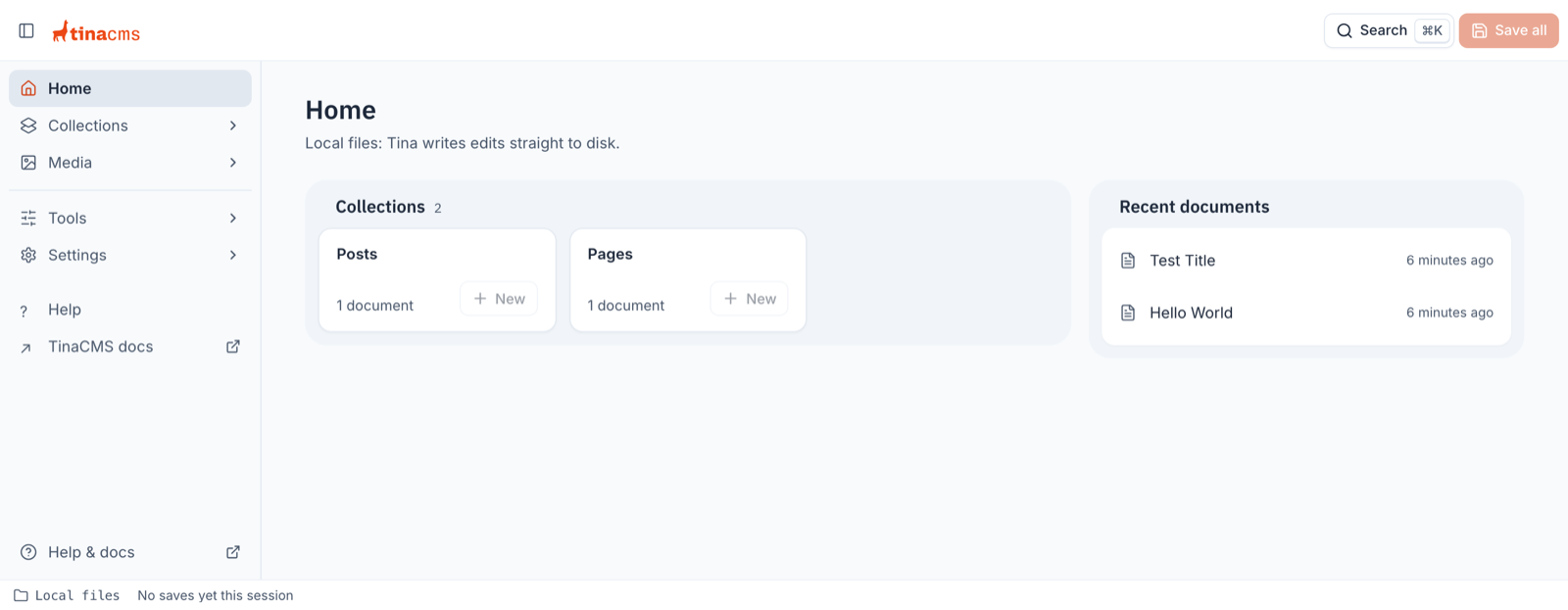
Figure: The v4 Home screen, with the rail, Top bar and Status bar.
💾 No more losing unsaved changes
Losing work is the worst. v4 keeps your unsaved edits as drafts, so a reload or a closed tab doesn't wipe them out (#7627).
When a field has a problem, the Save button changes to Resolve 1 error. Click it to see an error summary that takes you to each field that needs a fix (#8031).
In the middle of editing a bunch of documents? Use Save all in the Top bar to save them in one go (#8061).
We've improved validation too: each field shows its errors under it once you leave the field or try to save (#7945, #7988).
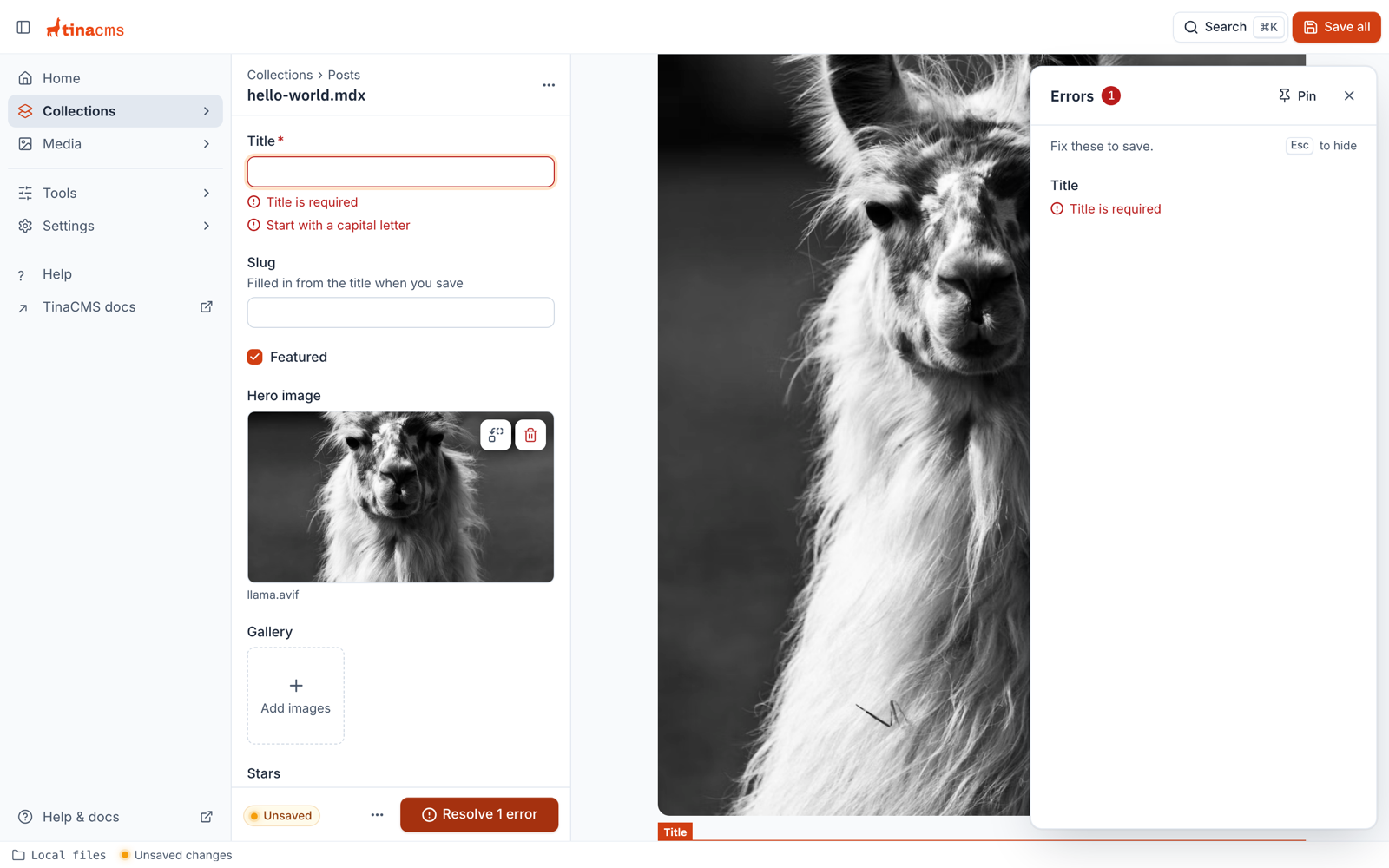
Figure: A blocked save tells you what to fix, and each field shows its own errors.
🔌 Plugins all the way down
A popular request and the biggest change under the hood. A plugin is a package that adds one feature to TinaCMS, without changing TinaCMS itself. In v4, media, search, login and even whole screens are plugins. A plugin can have a client side, for the screens and controls editors use, and a server side, for operations, secrets and file access. You can add plugins, swap them out or replace them, and you don't need to fork TinaCMS to do it (#7706).
This is the config for a whole v4 site. Each entry in plugins adds a feature:
import { defineConfig, mediaManagerPlugin, tinaCloud } from '@tinacms/tinacms';export default defineConfig({plugins: [tinaCloud({ clientId: process.env.TINA_PUBLIC_CLIENT_ID }),mediaManagerPlugin(),ratingFieldPlugin, // a custom field your team wrote],schema: { collections: [postCollection] },});
Each plugin provides their own capabilities, for example one tinaCloud() line gives you content, login and media. Add a search option and it gives you search too (#8057). Want your own media provider instead? Write a plugin for it.
🧭 Make the admin your own
The sidebar and the admin panel aren't fixed anymore. Any plugin can add its own entry to the sidebar, with a label and an icon. An entry can open a screen inside TinaCMS, open a link in a new tab, or run an action (#7686).
Home is a screen too. If your team wants its own dashboard, like publishing stats or a content calendar, swap out Home for your own screen (#8050, #7706).
export const dashboardPlugin = definePlugin({name: 'northwind:dashboard',provides: ['screen'],overrides: [{ capability: 'screen', key: 'home' }],client: async () => ({default: defineClientPlugin({screens: [{ name: 'home', label: 'Home', component: NorthwindDashboard }],slots: {globalNav: [{label: 'Style guide',icon: BookIcon,target: { kind: 'url', href: 'https://northwind.com/style' },},],},}),}),});
🗺️ What's next
We're still working through the rest of the editor, the migration codemod and the docs. The migration story will be smooth.
v3 is still getting improvements and QoL fixes.
If you'd like to follow along:
- Star the TinaCMS GitHub repository
- Share feedback in the TinaCMS v4 GitHub Discussion
- Join the conversation in the TinaCMS Discord
Best,
The TinaCMS Team 🦙